letting Framer agent build cool interactive on-brand image generators for me while I sip my iced coffee :))

Brand designer for tech startups. http://blunarova.com X: @0xCharlota writing Working Notes for designers who want to grow. prev: @IDEO
letting Framer agent build cool interactive on-brand image generators for me while I sip my iced coffee :))
$200-$300/month. That's how much I spend on AI design tools.
Claude (Max), Flora, Framer AI, Figma, Midjourney, plus an occassional test run of a new tool.
Is that too much? Too little?
Well, it depends. I don’t look at it in isolation, I count it against what it unlocks.
Two things:
→ Speed. I can do more in less time, so I can take on more work. For example, with Framer Agents, creating new website breakpoints or documenting styles is now done by an AI agent in a sweep, instead of me pushing pixels.
→ Range. It lets me make bolder creative calls and widen what I offer: art direction and image generation, or creating interactive brand tools I couldn’t have shipped before.
It’s priced into my services, and I earn multiples of it back. So, in the end, I’m getting paid for being both faster and broader.
Tokens are only getting more expensive, so we’ll see how the math evolves but right now that number is an easy yes.
How about you? Which AI tools do you currently pay for in your design work? How do you decide what's worth paying for versus using free?
i enjoy working with AI tools. but one thing i keep noticing: it's much harder to get into a proper flow while designing.
music on, moving stuff around, trying colours, type, composition. you get lost in it. i love it.
with AI it's more like: send a prompt, wait a few seconds, continue, wait again. like driving but braking every few metres. you never get onto the long open road on that great road trip.
so i tend to switch to another tab and try to work on something else. but it's constant context switching.
this is an observation, not a complaint. curious how others handle it?
what do you do in those few seconds or minutes while the AI agent does his job, or you wait for next round of image generation?
aaand, should i actually get a fidget spinner??
things i, a design generalist, will happily tell you to hire a design agency for:
- a launch where everything ships at once. brand, site, launch video, campaign, same week. one person becomes the bottleneck. an agency runs it in parallel.
- multiple deep specialists. motion, 3D, packaging and print work, a design system at real scale. breadth is my job. that kind of depth is theirs.
- procurement. later-stage companies come with vendor onboarding, security reviews, MSAs, insurance minimums. a lot of that machinery turns a sole freelancer away by default. an agency clears it because it's built to.
- the project management layer. an agency hands you a producer whose whole job is that. if no one on your team can or have the time to direct a designer, agency is a better option.
- a famous name. sometimes you're buying the logo on the deck as much as the logo you're paying for.
for most tech startups (my usual clients), you'll hit none of these for a long time. a strong generalist designer gets you further than you'd think.
but i'll be the first to tell you when you've grown enough to move to a design agency or in-house team. yep, saying it costs me a job, but keeps the trust (which is the better trade anyway!)
web design is a screen job. sometimes you want something you can hold.
but this year i wanted to make things with my hands again, just for fun, no deliverable. so i started a craft evening for my girlfriends — casual (witch)craft.
we make something, gossip, do tarot readings, eat snacks, drink wine. we painted ceramic mugs this week. previously, we arranged flower bouquets, made christmas ornaments and vision boards. the kind of making a normal work day never leaves room for.
and it's better with people. friends bring their friends, i've made several new ones this way.
so, don't be afraid to start the thing, however small. build the third space for your community yourself.
just shipped my first Framer template! a minimalist brand manual, built mostly with the Framer Agent, ready for you to drop your brand assets into. one page, everything in scroll. free to use and remix.
currently working on
- CMF for a kids hardware product
- a set of AI-generated photography for a healthcare startup
- a brand identity refresh for an iconic crypto company
- moodboarding and planning production of a launch video and photoshoot for hardware startup
- testing and documenting new features of my fav design tool
five briefs, five different worlds. i looove the diversity
i tried Framer Agent to build a brand guidelines website template — something i've meant to do for a while. a site i can swap a logo, nudge a colour, update the type, and send a link instead of re-exporting a pdf nobody opens.
a few observations on the AI process:
- i started with references. pulled together a handful of minimalist grid layouts and had Claude describe the visual style back to me. you can do the same inside Framer, feeding it the references directly.
- from there i had it write a detailed prompt aimed at that exact style, then asked it to break it into a few smaller steps. then i fed those into the agent, one at a time.
- the scaffolding stage is the satisfying part. for something this grid-driven (the columns, the spans, the whole underlying structure) watching it land in seconds is hard to look away from.
- but then i still have to sweat the details: text alignment, line-heights, image sizes. i don't mind it at all; it's the part i like, making these design decisions.
the strength of the agent is the mundane work. point it at the stuff that eats your time: cleaning up the build, adding responsiveness, dropping in small effects, checking text and colour styles stay consistent, writing alt text for every image.
then i get the time back for the parts of web design that are actually fun. 🤝
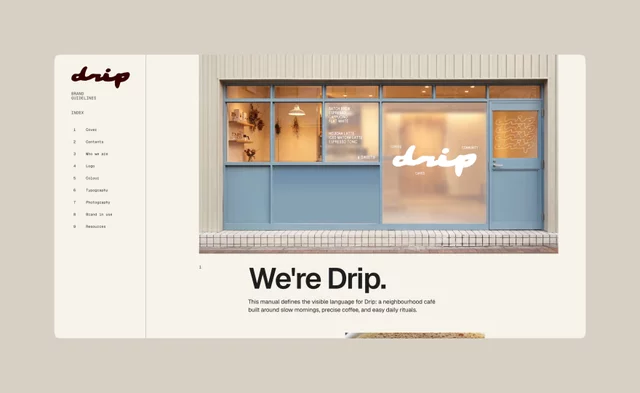
Thinking I'll try to use the Agent to build web version of brand guidelines...! What's everyone else building?
being a one-person studio used to cap how much i could take on. not anymore.
The new Framer Agent speeds up my workflows so i can focus on the fun parts of web design. 🙌
In my first test run, i had the Agent:
✅ adapt my desktop design to mobile and tablet breakpoints
✅ clean up my fonts into consistent text styles across the whole site (oh god i needed this)
✅ write alt text for every image
✅ build a nav bar from scratch off an image reference i pasted in
✅ brainstorm and create layout variations for a web section
✅ turn a few images into a sleek rotating card stack animation
and all of it happened in minutes, on the actual website, the place where i already design, edit and maintain. the Framer Agent moves faaaast, which means i can ship bolder, more creative ideas. 🤝
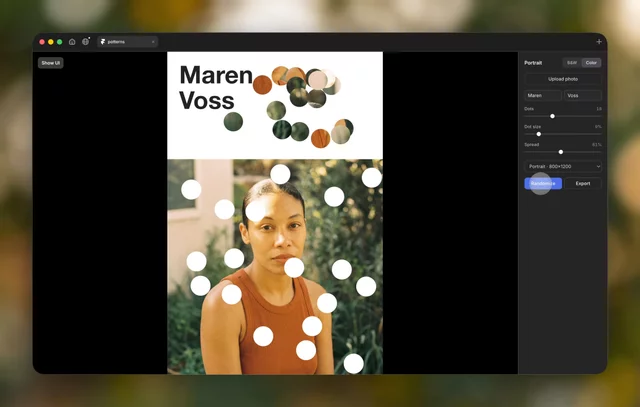
I've been building brand tools with AI lately and it's the most fun i've had with design in years. not generating finished assets, but building the generator that makes on-brand textures / patterns / key visuals on demand.
turns out, many designers are vibecoding tools like this!
so i'm starting a running thread to collect the good ones. LINK to X ->
every brand designer thinks they have a good eye until they’re crouched over a Pantone book in bad office lighting whispering “no that’s warmer” to no one
i'd been quietly manifesting an office space for months. apparently the universe took notes, because one came up for rent on my own street! great light, lots of space, two minutes from my front door.moved in a table, a chair, a few objects; that's the whole setup so far.
my first real studio space, and it landed basically next door. i'll take it!
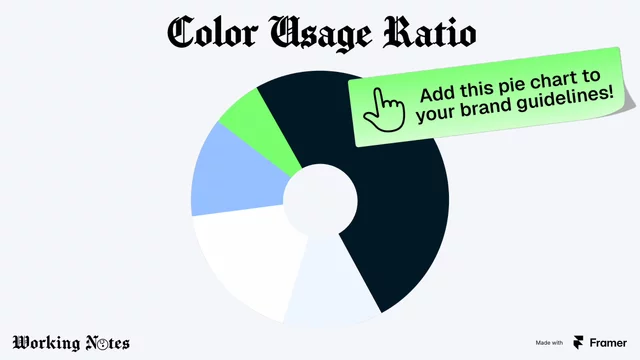
Screenshot this & don't forget to add it to your next brand design guidelines:
Color usage ratio!
Instead of only presenting a set of color swatches, show the palette in proportion. Because colors are not just a list of options. They form a system. This is why I sometimes include literal pie chart in brand guidelines. (this one was made with Framer!)
The chart makes visible how the brand is meant to behave over time.
-> The largest slice represents the default surface.
-> The medium slices support and structure the system.
-> The smallest slice is the accent, an intentional interrupt that only works when used sparingly.
When this logic isn’t made explicit, teams are forced to guess, accents slowly turn into backgrounds, and backgrounds lose their quiet role. And the brand drifts without anyone noticing.
Most brand guidelines tell you what colors exist.
Very few tell you how they should behave.
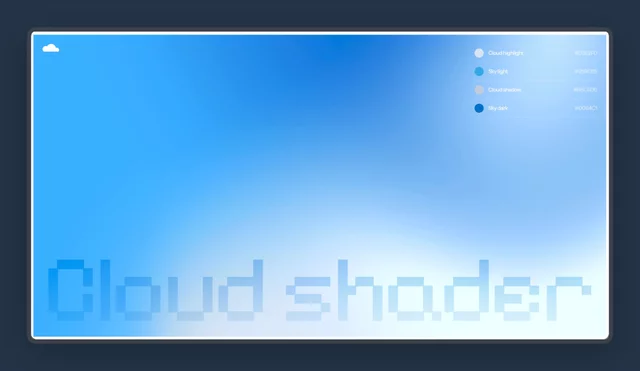
Cloud shader, like a sky on a perfect summer day, built in @Framer (remix link below!).
Some tips :
- start with the Wave Shader -> change the Seed to get different cloud types. Useful for variety if you use the shader across a few sections.
- shaders load a millisecond after the page does. So I added an Appear effect to the shader itself, plus a rectangular background in blue behind it, so the clouds fade in clean.
so excited to port over my design series: Working Notes!
It's all about the tiny heuristics, visual judgment calls, and lessons learned from my time at IDEO and running my design practice. With all the mistakes and re-do’s. The stuff that helps you escape junior mode.
I'll keep posting those mini lessons here; feedback, questions, all are appreciated!