sherwin12h
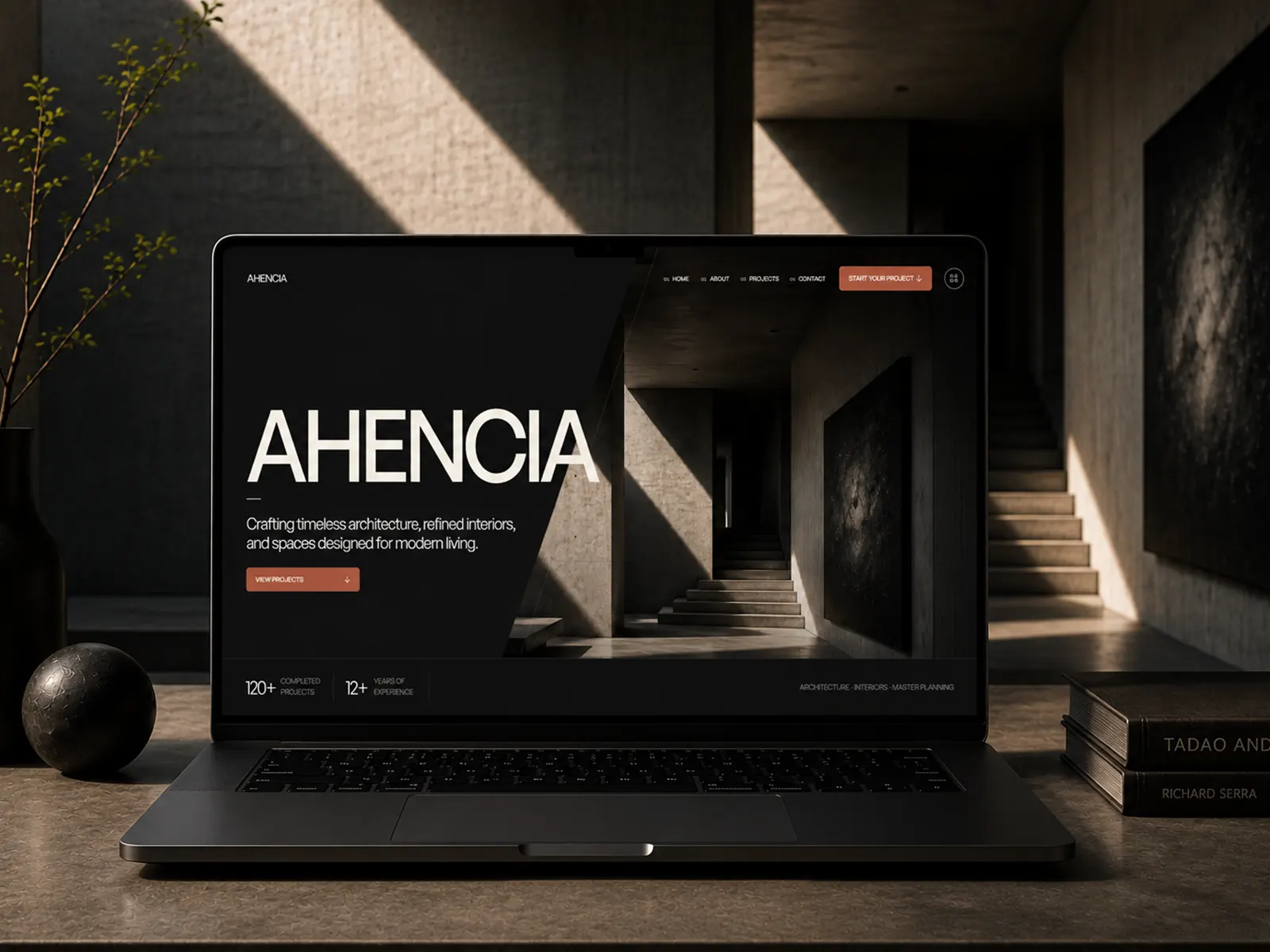
Sneak peek! 👁️✨
Currently putting the final touches on my 11th Framer template. Dropping soon... Blue or Green? What do you think?
Sneak peek! 👁️✨
Currently putting the final touches on my 11th Framer template. Dropping soon... Blue or Green? What do you think?
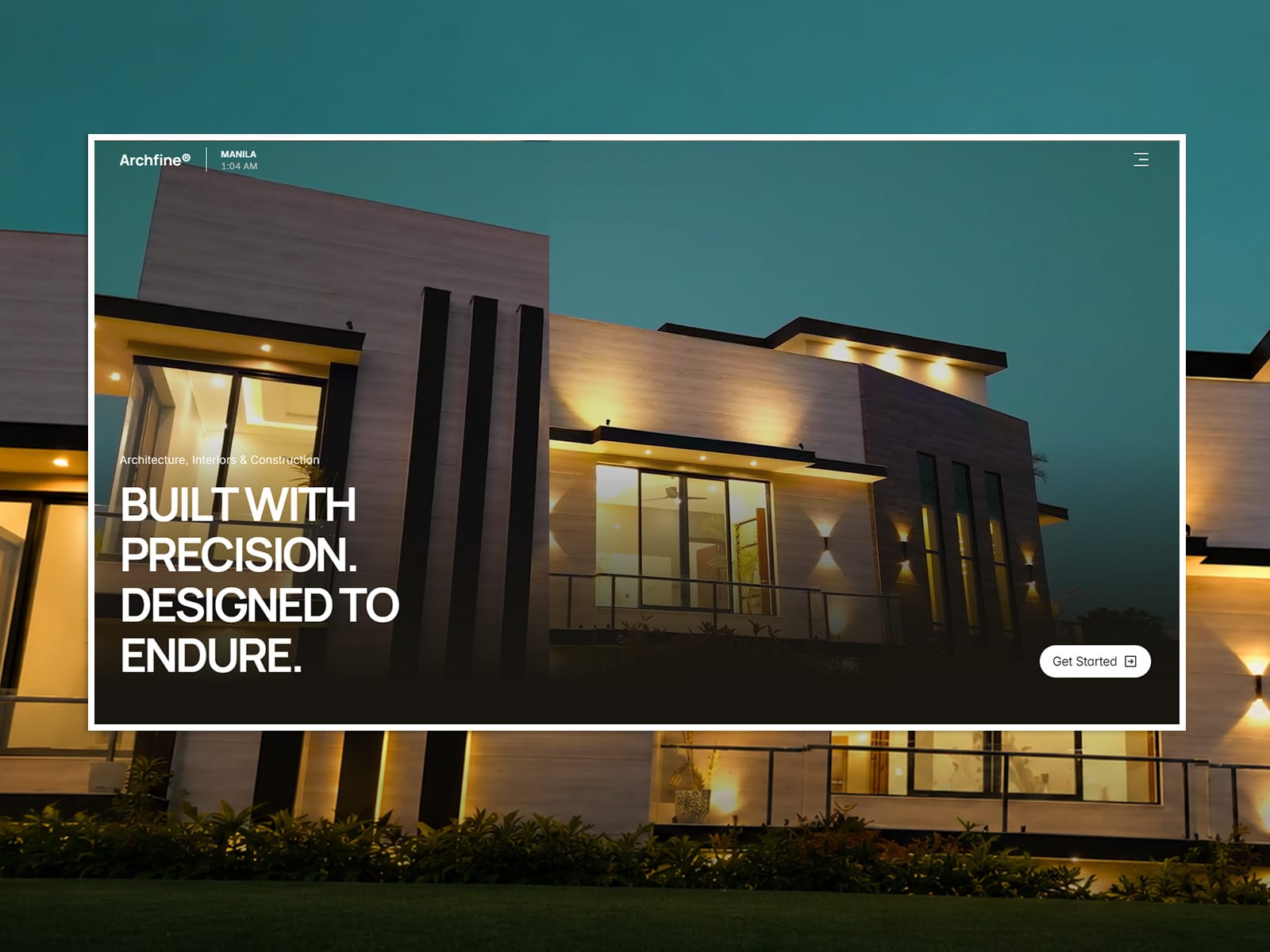
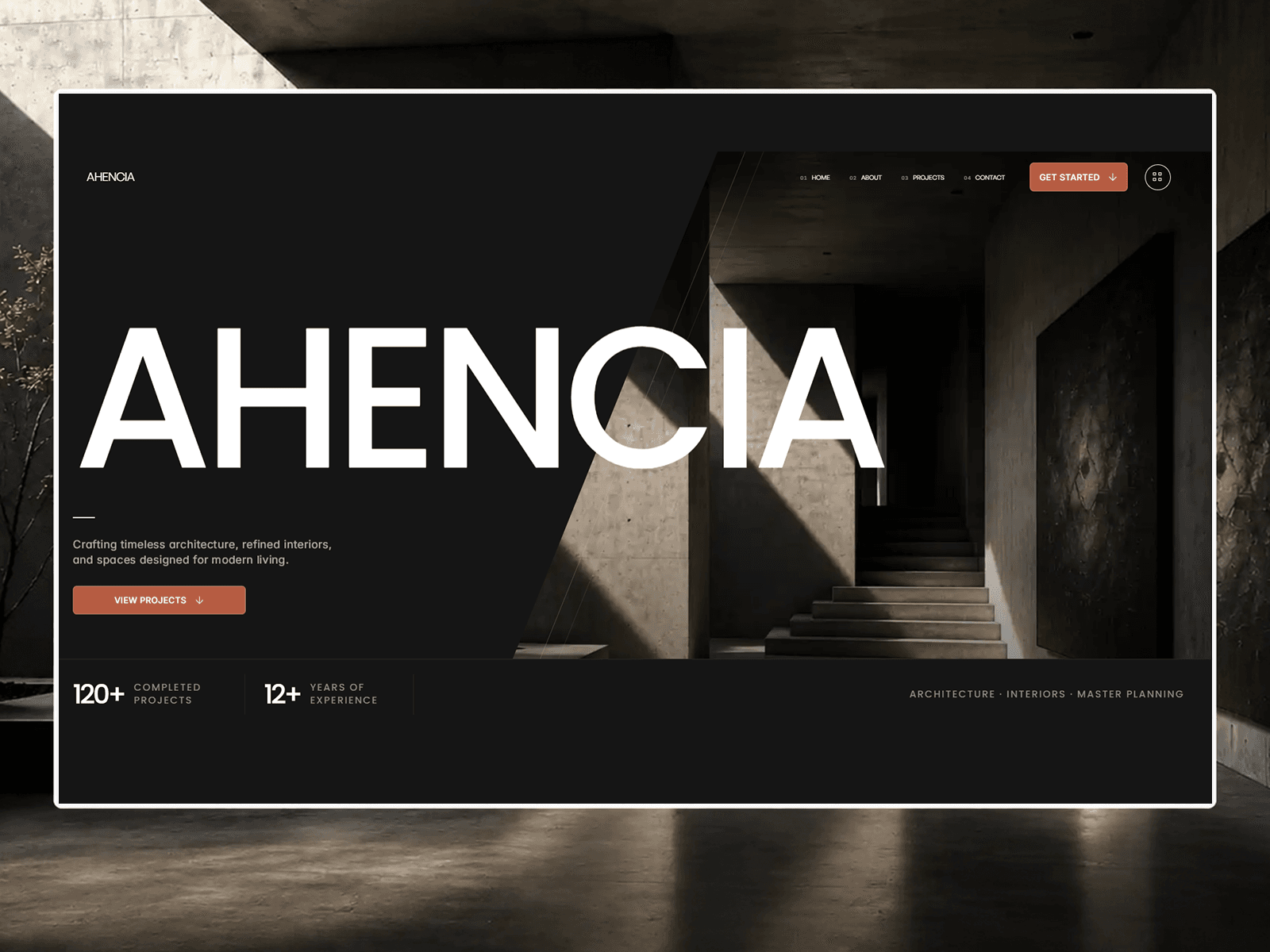
Archfine® is a Framer template for architecture, interior design, and construction studios, combining bold typography, generous spacing, and immersive imagery to keep your projects at center stage. It includes everything a studio needs: project showcases, portfolio pages, services, an about section, a process overview, testimonials, FAQ, and a journal. Layouts are fully responsive with subtle animations and easy customization. It's also built for speed, scoring 96 on Google PageSpeed Insights (Desktop) with a perfect 100 in Accessibility, Best Practices, and SEO.
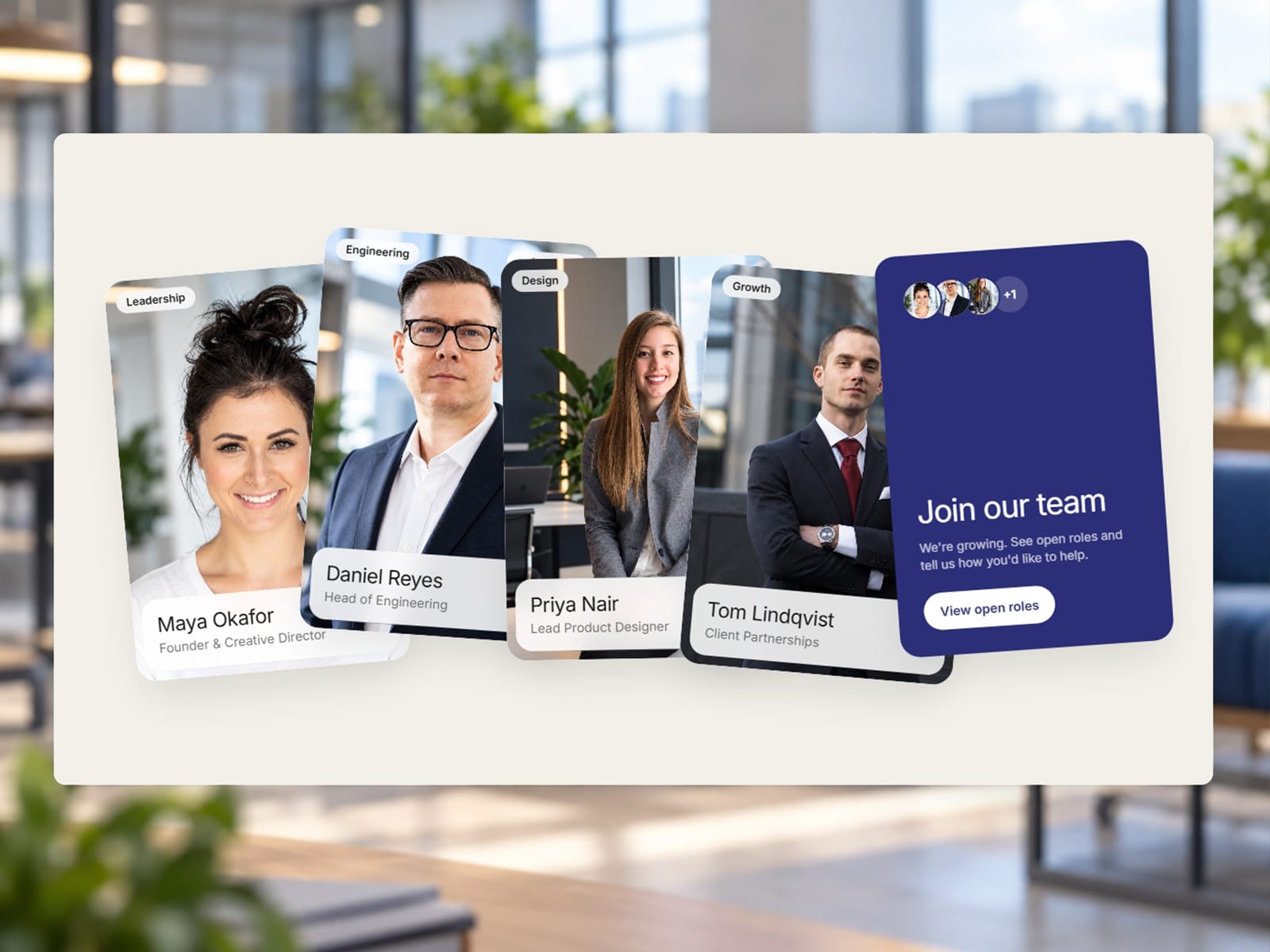
Team Stack Cards is a flexible Framer component for creating polished, interactive team sections for studios, startups, agencies, and careers pages. It features animated card stacks, multiple layout presets, expandable bios, social links, customizable themes, Join Us CTA cards, hover lift, 3D pointer tilt, light sheen, responsive spacing, and mobile static list support. You can control the card layout, typography, colors, spacing, entry direction, and animation settings. Scroll animation can also be disabled while keeping interactive hover and pointer effects active, giving you complete control over how the component behaves across desktop and mobile.
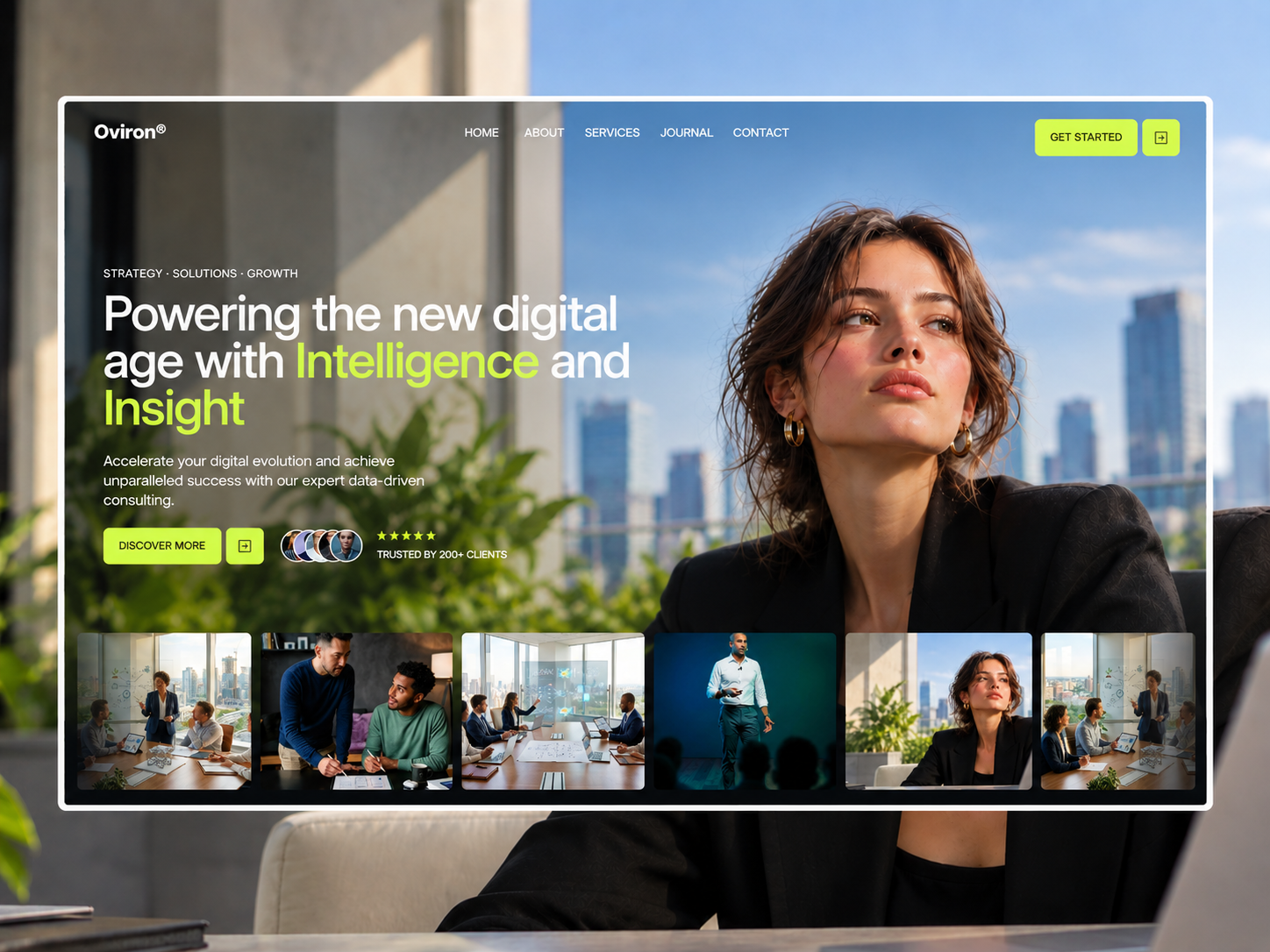
OVIRON is now 100% FREE.
A sleek Framer template designed for AI consulting, data strategy, and enterprise automation agencies.
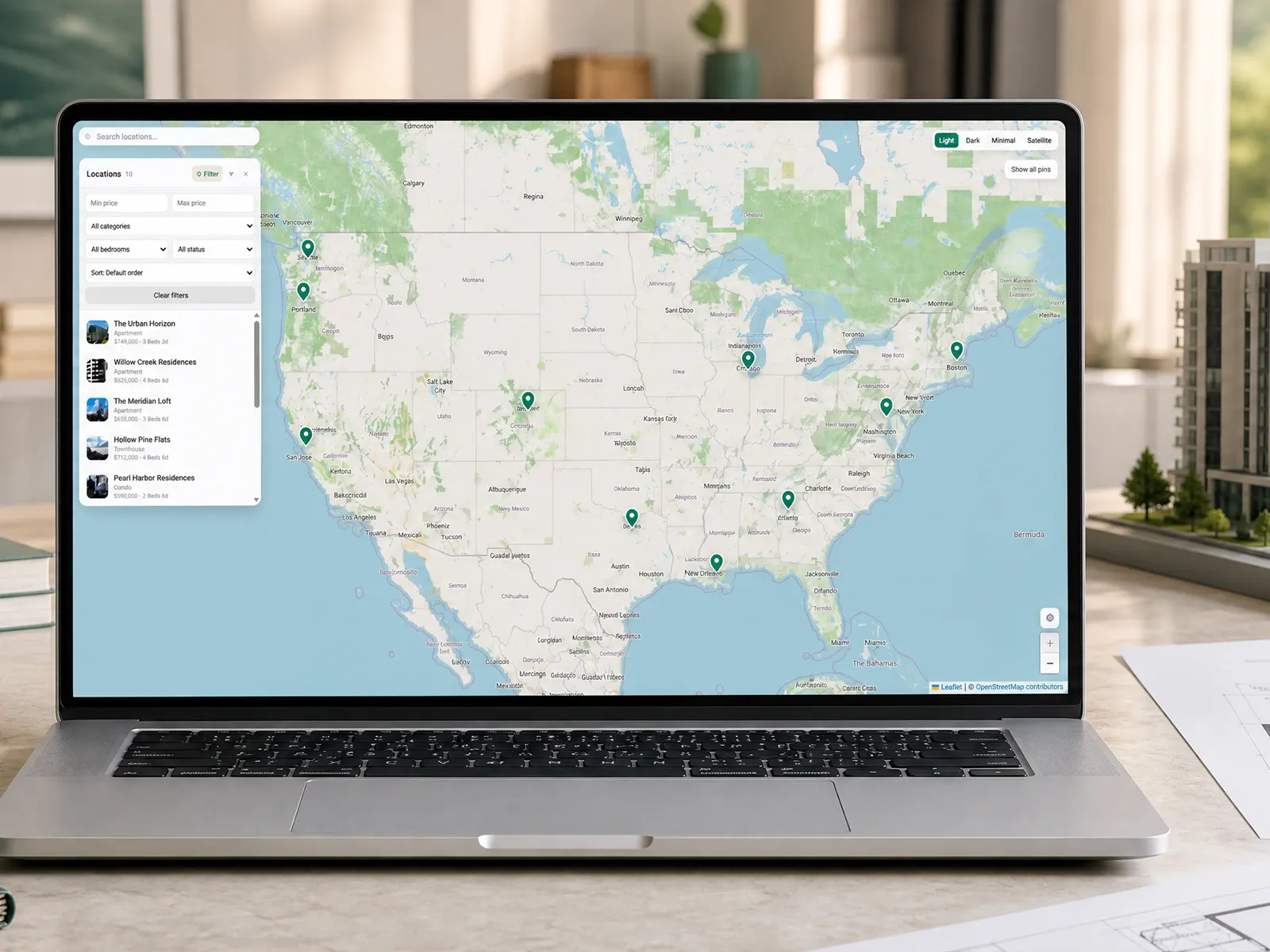
Map Locator CMS hit #1 in Paid and #2 Overall in the Maps category! 🏆
Huge thanks to everyone who bought a copy! Elevate your Framer location pages, directories, and store locators here:
Version Log — Map Locator CMS Update
Version 1.0.3
Custom Marker Improvements
The map now supports custom marker artwork for individual locations and for all pins through the default marker setting. Uploaded SVG, PNG, JPG, and WebP icons are rendered inside the custom pin while preserving their proportions. The main custom marker pin was increased by 16%, while the icon artwork remains at its existing size and is centered within the pin’s circular head to prevent overlap with the marker edges.
Category Filter Improvements
Clicking a category tab now resets the map viewport and automatically fits all visible locations in the selected category. Clicking the currently selected category again also resets the map view, and any selected location popup is cleared when changing categories. The behavior is applied consistently across both category-tab layouts.
Apple Maps and Waze Directions
Location details now include direct navigation links for Apple Maps and Waze. Visitors can select the configured Apple Maps or Waze action to get directions to the selected location using its latitude and longitude coordinates. Both links support customizable button labels and can be enabled or disabled independently.
Distance from Your Location
The map can use the visitor’s current location to calculate and display how far each location is away in miles. Visitors can also sort locations by distance to find the nearest available place more quickly.
Office Local Time and Status
Office locations can display their current local time based on the configured timezone. The office details can also show operating hours and an availability or open-status indicator, helping visitors understand whether an office is currently open.
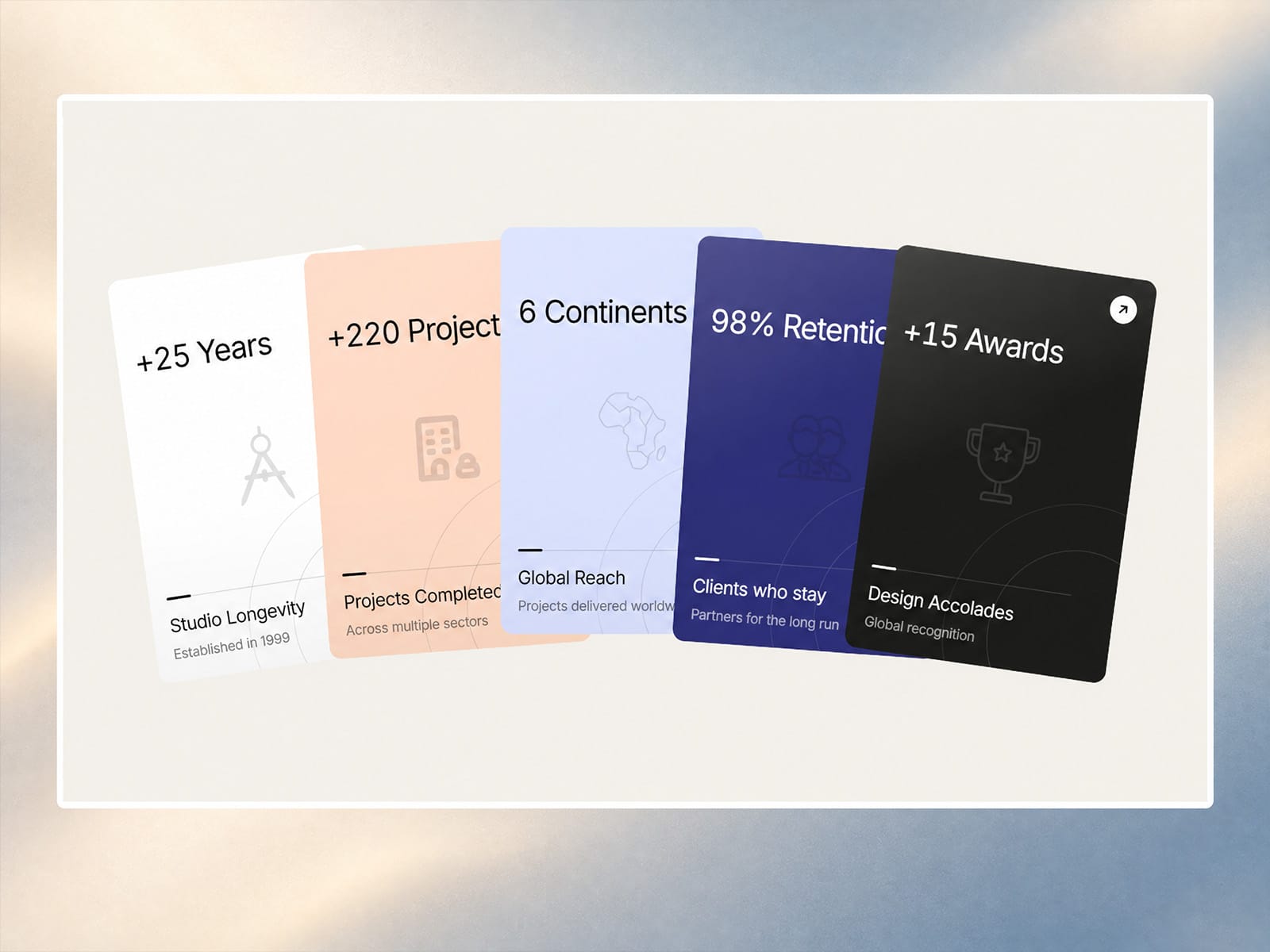
Statistics Stack Cards is a customizable Framer component for showcasing images, achievements, metrics, and results in an engaging layered card layout. It includes scroll-triggered animations, animated number count-ups, multiple data visualizations, customizable themes, layout presets, hover effects, responsive behavior, and detailed controls for card sizing, spacing, typography, colors, shadows, and motion. Ideal for portfolios, agencies, case studies, dashboards, SaaS websites, studios, and personal sites.
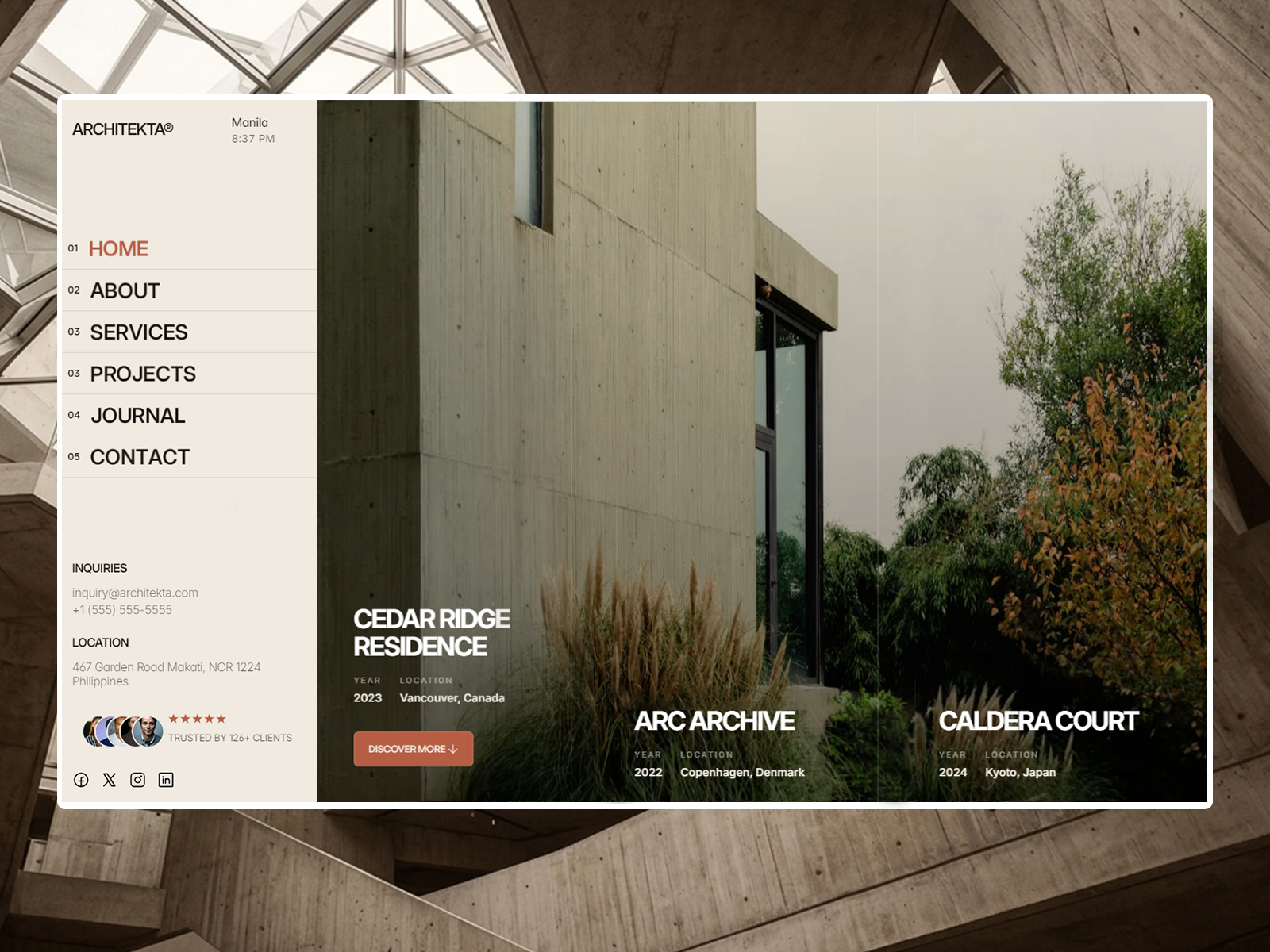
ARCHITEKTA® is now completely FREE.
A brutalist-minimalist Framer template built specifically for architecture studios, interior designers, and luxury real estate firms.
Magnetic Override for Framer
A code override that makes any element pulled toward the cursor when you get close. It springs back when you move away. It works on buttons, cards, logos, nav items, or any other frame.
How to install
In Framer, open the Assets panel and go to Code.
Click + and choose New File → Override.
Name it Magnetic and replace the contents with the code below.
Save the file.
How to use
Select the element on the canvas (a button, card, or logo).
In the right panel, scroll to Code Overrides.
Choose the file Magnetic and then the override withMagnetic.
Open Preview and move your cursor near the element. The effect doesn't show on the canvas, only in Preview and on the live site.
Settings
All settings are in the MAGNET object at the top of the file.
SettingDefaultWhat it doesstrength0.35How far the element follows the cursor (0 to 1). Higher moves further.radius120Distance in px from the element's edge where the pull begins.spring200 / 15 / 0.2stiffness, damping and mass. Lower damping gives a bouncier feel, and higher stiffness gives a snappier one.
Presets
Subtle: strength: 0.2, radius: 80
Playful: strength: 0.5, radius: 160, damping: 10
Snappy: stiffness: 300, damping: 20
Tips
The override moves the whole frame. To make an icon or label move more than its button, apply the override to the inner element too, with a higher strength.
Magnetic elements are easier to click if you leave some space around them, since the target moves.
It's a mouse effect, so on touch devices nothing happens and the element stays put.
Here’s a first look at a clean, modern framer component Statistics Cards designed to make your numbers and achievements stand out without overwhelming the page.
Whether you’re showcasing clients, projects, growth, or results — these cards are made to turn simple numbers into meaningful moments.
Coming soon. Stay tuned. 👀
Pricing Service Deck - a Framer component built to make pricing sections more interactive.
Key Features:
• 3D flip cards
• Monthly & yearly pricing
• Featured plan badges
• Flexible service lists
• Custom images & icons
• Fully responsive
• GSAP scroll animations
• Highly customizable
Pricing Service Deck is an interactive Framer component designed to showcase pricing plans, services, and features through modern 3D flip cards. It includes monthly and yearly pricing toggles, customizable service lists, featured badges, images, icons, and call-to-action buttons. With responsive layouts, smooth GSAP animations, and extensive styling options, it helps SaaS businesses, agencies, freelancers, and studios create engaging, professional pricing sections that are visually appealing, user-friendly, and easy to customize.
Testimonial Deck - a dynamic Framer testimonial component designed to showcase customer reviews, ratings, and social proof with an engaging animated card stack.
Key features:
• Animated testimonial cards with smooth GSAP scroll effects
• Custom customer quotes, ratings, avatars, and themes
• Flexible typography and testimonial card styling
• Interactive hover animations for added depth
• Responsive testimonial layouts for desktop and mobile
• Optional mobile-friendly static testimonial list
Create polished testimonial sections, customer reviews, and social proof for SaaS websites, agencies, startups, portfolios, and creative businesses — without compromising on design or performance.
InteractiveStackCard - Services & Pricing Table
Version Log — 2026-09-30
Animation & Layout
Removed overflow clipping from the cards and animation wrapper.
Prevented cards, tilted edges, and shadows from being hidden during entry animations.
Added reduced-motion support for users who prefer fewer animations.
Made the scroll height dynamic based on the number of cards.
Added new entry direction options:
Alternate — cards enter from the top and bottom.
Sides — cards enter from the left and right.
Center — cards scale in from the center.
Added an optional Exit Animation toggle for scroll animations.
Hero Section
Added a Show Hero Section toggle.
The toggle hides the hero title, subtitle, description, and button.
Removed the hero-to-card delay when the hero section is disabled.
Property Controls
Corrected the Features property control to use the expected structure:
TSX
{ text: string, included: boolean }
Replaced the malformed card-level objects in the Features default value with valid feature items.
Static Rendering
Improved Framer canvas and export rendering.
Disabled GSAP animations in static mode.
Disabled background transitions and continuous effects in static mode.
Disabled resize, fullscreen, and media-query listeners during static rendering.
Replaced animated card wrappers with plain elements in static preview mode.
Added a plain static button rendering path to prevent hover-animation artifacts during export.
Testimonial Deck is a dynamic Framer component that transforms testimonials into an engaging animated card stack. Customize quotes, ratings, avatars, themes, typography, card styling, and animation directions, with smooth GSAP scroll effects, interactive hover lifts, responsive layouts, and an optional mobile-friendly static list. Perfect for creating polished, modern testimonial sections for agencies, SaaS, startups, portfolios, and creative websites.
framer analytics recorded 1 conversion, while dubdotco reflects 0 and there's no email notification can someone explain this? thanks
Working on a new Framer template called Archifine, built for architecture, interior design, and construction studios. Still putting on the final touches.
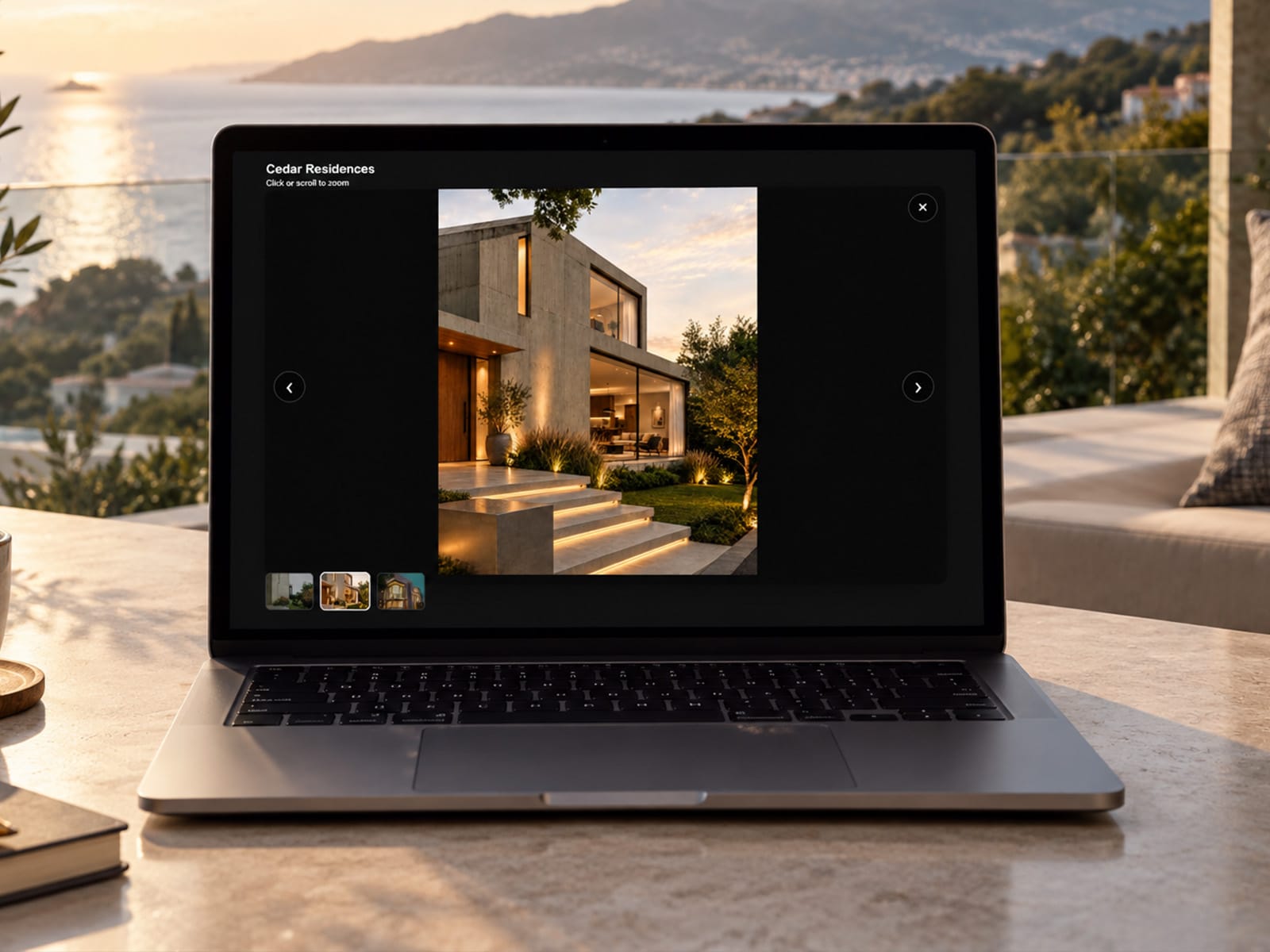
Smart Media Lightbox brings images and videos to life with a sleek, responsive fullscreen experience. Use it as a simple single lightbox or connect multiple media items into a seamless gallery with zoom, pan, navigation, thumbnails, and optimized video playback—all with flexible styling built for Framer.
Smart Media Lightbox is a flexible Framer component designed for creating polished, responsive image and video viewing experiences. It can work as a standalone lightbox or as part of a connected gallery, allowing multiple media items to share the same group for seamless navigation. It supports fullscreen viewing, smooth zoom and pan interactions, gallery navigation, thumbnails, responsive overlays, video playback optimization, keyboard and touch controls, and accessible media settings. With customizable styling and Framer-friendly responsive behavior, it’s ideal for portfolios, photography, architecture, real estate, products, case studies, and other media-focused websites.
Sneak peek! 👁️✨
Currently putting the final touches on my 11th Framer template. Dropping soon... Blue or Green? What do you think?
Archfine® is a Framer template for architecture, interior design, and construction studios, combining bold typography, generous spacing, and immersive imagery to keep your projects at center stage. It includes everything a studio needs: project showcases, portfolio pages, services, an about section, a process overview, testimonials, FAQ, and a journal. Layouts are fully responsive with subtle animations and easy customization. It's also built for speed, scoring 96 on Google PageSpeed Insights (Desktop) with a perfect 100 in Accessibility, Best Practices, and SEO.
Team Stack Cards is a flexible Framer component for creating polished, interactive team sections for studios, startups, agencies, and careers pages. It features animated card stacks, multiple layout presets, expandable bios, social links, customizable themes, Join Us CTA cards, hover lift, 3D pointer tilt, light sheen, responsive spacing, and mobile static list support. You can control the card layout, typography, colors, spacing, entry direction, and animation settings. Scroll animation can also be disabled while keeping interactive hover and pointer effects active, giving you complete control over how the component behaves across desktop and mobile.
OVIRON is now 100% FREE.
A sleek Framer template designed for AI consulting, data strategy, and enterprise automation agencies.
Map Locator CMS hit #1 in Paid and #2 Overall in the Maps category! 🏆
Huge thanks to everyone who bought a copy! Elevate your Framer location pages, directories, and store locators here:
Version Log — Map Locator CMS Update
Version 1.0.3
Custom Marker Improvements
The map now supports custom marker artwork for individual locations and for all pins through the default marker setting. Uploaded SVG, PNG, JPG, and WebP icons are rendered inside the custom pin while preserving their proportions. The main custom marker pin was increased by 16%, while the icon artwork remains at its existing size and is centered within the pin’s circular head to prevent overlap with the marker edges.
Category Filter Improvements
Clicking a category tab now resets the map viewport and automatically fits all visible locations in the selected category. Clicking the currently selected category again also resets the map view, and any selected location popup is cleared when changing categories. The behavior is applied consistently across both category-tab layouts.
Apple Maps and Waze Directions
Location details now include direct navigation links for Apple Maps and Waze. Visitors can select the configured Apple Maps or Waze action to get directions to the selected location using its latitude and longitude coordinates. Both links support customizable button labels and can be enabled or disabled independently.
Distance from Your Location
The map can use the visitor’s current location to calculate and display how far each location is away in miles. Visitors can also sort locations by distance to find the nearest available place more quickly.
Office Local Time and Status
Office locations can display their current local time based on the configured timezone. The office details can also show operating hours and an availability or open-status indicator, helping visitors understand whether an office is currently open.
Statistics Stack Cards is a customizable Framer component for showcasing images, achievements, metrics, and results in an engaging layered card layout. It includes scroll-triggered animations, animated number count-ups, multiple data visualizations, customizable themes, layout presets, hover effects, responsive behavior, and detailed controls for card sizing, spacing, typography, colors, shadows, and motion. Ideal for portfolios, agencies, case studies, dashboards, SaaS websites, studios, and personal sites.
ARCHITEKTA® is now completely FREE.
A brutalist-minimalist Framer template built specifically for architecture studios, interior designers, and luxury real estate firms.
Magnetic Override for Framer
A code override that makes any element pulled toward the cursor when you get close. It springs back when you move away. It works on buttons, cards, logos, nav items, or any other frame.
How to install
In Framer, open the Assets panel and go to Code.
Click + and choose New File → Override.
Name it Magnetic and replace the contents with the code below.
Save the file.
How to use
Select the element on the canvas (a button, card, or logo).
In the right panel, scroll to Code Overrides.
Choose the file Magnetic and then the override withMagnetic.
Open Preview and move your cursor near the element. The effect doesn't show on the canvas, only in Preview and on the live site.
Settings
All settings are in the MAGNET object at the top of the file.
SettingDefaultWhat it doesstrength0.35How far the element follows the cursor (0 to 1). Higher moves further.radius120Distance in px from the element's edge where the pull begins.spring200 / 15 / 0.2stiffness, damping and mass. Lower damping gives a bouncier feel, and higher stiffness gives a snappier one.
Presets
Subtle: strength: 0.2, radius: 80
Playful: strength: 0.5, radius: 160, damping: 10
Snappy: stiffness: 300, damping: 20
Tips
The override moves the whole frame. To make an icon or label move more than its button, apply the override to the inner element too, with a higher strength.
Magnetic elements are easier to click if you leave some space around them, since the target moves.
It's a mouse effect, so on touch devices nothing happens and the element stays put.
Here’s a first look at a clean, modern framer component Statistics Cards designed to make your numbers and achievements stand out without overwhelming the page.
Whether you’re showcasing clients, projects, growth, or results — these cards are made to turn simple numbers into meaningful moments.
Coming soon. Stay tuned. 👀
Pricing Service Deck - a Framer component built to make pricing sections more interactive.
Key Features:
• 3D flip cards
• Monthly & yearly pricing
• Featured plan badges
• Flexible service lists
• Custom images & icons
• Fully responsive
• GSAP scroll animations
• Highly customizable
Pricing Service Deck is an interactive Framer component designed to showcase pricing plans, services, and features through modern 3D flip cards. It includes monthly and yearly pricing toggles, customizable service lists, featured badges, images, icons, and call-to-action buttons. With responsive layouts, smooth GSAP animations, and extensive styling options, it helps SaaS businesses, agencies, freelancers, and studios create engaging, professional pricing sections that are visually appealing, user-friendly, and easy to customize.
Testimonial Deck - a dynamic Framer testimonial component designed to showcase customer reviews, ratings, and social proof with an engaging animated card stack.
Key features:
• Animated testimonial cards with smooth GSAP scroll effects
• Custom customer quotes, ratings, avatars, and themes
• Flexible typography and testimonial card styling
• Interactive hover animations for added depth
• Responsive testimonial layouts for desktop and mobile
• Optional mobile-friendly static testimonial list
Create polished testimonial sections, customer reviews, and social proof for SaaS websites, agencies, startups, portfolios, and creative businesses — without compromising on design or performance.
InteractiveStackCard - Services & Pricing Table
Version Log — 2026-09-30
Animation & Layout
Removed overflow clipping from the cards and animation wrapper.
Prevented cards, tilted edges, and shadows from being hidden during entry animations.
Added reduced-motion support for users who prefer fewer animations.
Made the scroll height dynamic based on the number of cards.
Added new entry direction options:
Alternate — cards enter from the top and bottom.
Sides — cards enter from the left and right.
Center — cards scale in from the center.
Added an optional Exit Animation toggle for scroll animations.
Hero Section
Added a Show Hero Section toggle.
The toggle hides the hero title, subtitle, description, and button.
Removed the hero-to-card delay when the hero section is disabled.
Property Controls
Corrected the Features property control to use the expected structure:
TSX
{ text: string, included: boolean }
Replaced the malformed card-level objects in the Features default value with valid feature items.
Static Rendering
Improved Framer canvas and export rendering.
Disabled GSAP animations in static mode.
Disabled background transitions and continuous effects in static mode.
Disabled resize, fullscreen, and media-query listeners during static rendering.
Replaced animated card wrappers with plain elements in static preview mode.
Added a plain static button rendering path to prevent hover-animation artifacts during export.
Testimonial Deck is a dynamic Framer component that transforms testimonials into an engaging animated card stack. Customize quotes, ratings, avatars, themes, typography, card styling, and animation directions, with smooth GSAP scroll effects, interactive hover lifts, responsive layouts, and an optional mobile-friendly static list. Perfect for creating polished, modern testimonial sections for agencies, SaaS, startups, portfolios, and creative websites.
framer analytics recorded 1 conversion, while dubdotco reflects 0 and there's no email notification can someone explain this? thanks
Working on a new Framer template called Archifine, built for architecture, interior design, and construction studios. Still putting on the final touches.
Smart Media Lightbox brings images and videos to life with a sleek, responsive fullscreen experience. Use it as a simple single lightbox or connect multiple media items into a seamless gallery with zoom, pan, navigation, thumbnails, and optimized video playback—all with flexible styling built for Framer.
Smart Media Lightbox is a flexible Framer component designed for creating polished, responsive image and video viewing experiences. It can work as a standalone lightbox or as part of a connected gallery, allowing multiple media items to share the same group for seamless navigation. It supports fullscreen viewing, smooth zoom and pan interactions, gallery navigation, thumbnails, responsive overlays, video playback optimization, keyboard and touch controls, and accessible media settings. With customizable styling and Framer-friendly responsive behavior, it’s ideal for portfolios, photography, architecture, real estate, products, case studies, and other media-focused websites.
Sneak peek! 👁️✨
Currently putting the final touches on my 11th Framer template. Dropping soon... Blue or Green? What do you think?
Archfine® is a Framer template for architecture, interior design, and construction studios, combining bold typography, generous spacing, and immersive imagery to keep your projects at center stage. It includes everything a studio needs: project showcases, portfolio pages, services, an about section, a process overview, testimonials, FAQ, and a journal. Layouts are fully responsive with subtle animations and easy customization. It's also built for speed, scoring 96 on Google PageSpeed Insights (Desktop) with a perfect 100 in Accessibility, Best Practices, and SEO.
Team Stack Cards is a flexible Framer component for creating polished, interactive team sections for studios, startups, agencies, and careers pages. It features animated card stacks, multiple layout presets, expandable bios, social links, customizable themes, Join Us CTA cards, hover lift, 3D pointer tilt, light sheen, responsive spacing, and mobile static list support. You can control the card layout, typography, colors, spacing, entry direction, and animation settings. Scroll animation can also be disabled while keeping interactive hover and pointer effects active, giving you complete control over how the component behaves across desktop and mobile.
OVIRON is now 100% FREE.
A sleek Framer template designed for AI consulting, data strategy, and enterprise automation agencies.
Map Locator CMS hit #1 in Paid and #2 Overall in the Maps category! 🏆
Huge thanks to everyone who bought a copy! Elevate your Framer location pages, directories, and store locators here:
Version Log — Map Locator CMS Update
Version 1.0.3
Custom Marker Improvements
The map now supports custom marker artwork for individual locations and for all pins through the default marker setting. Uploaded SVG, PNG, JPG, and WebP icons are rendered inside the custom pin while preserving their proportions. The main custom marker pin was increased by 16%, while the icon artwork remains at its existing size and is centered within the pin’s circular head to prevent overlap with the marker edges.
Category Filter Improvements
Clicking a category tab now resets the map viewport and automatically fits all visible locations in the selected category. Clicking the currently selected category again also resets the map view, and any selected location popup is cleared when changing categories. The behavior is applied consistently across both category-tab layouts.
Apple Maps and Waze Directions
Location details now include direct navigation links for Apple Maps and Waze. Visitors can select the configured Apple Maps or Waze action to get directions to the selected location using its latitude and longitude coordinates. Both links support customizable button labels and can be enabled or disabled independently.
Distance from Your Location
The map can use the visitor’s current location to calculate and display how far each location is away in miles. Visitors can also sort locations by distance to find the nearest available place more quickly.
Office Local Time and Status
Office locations can display their current local time based on the configured timezone. The office details can also show operating hours and an availability or open-status indicator, helping visitors understand whether an office is currently open.
Statistics Stack Cards is a customizable Framer component for showcasing images, achievements, metrics, and results in an engaging layered card layout. It includes scroll-triggered animations, animated number count-ups, multiple data visualizations, customizable themes, layout presets, hover effects, responsive behavior, and detailed controls for card sizing, spacing, typography, colors, shadows, and motion. Ideal for portfolios, agencies, case studies, dashboards, SaaS websites, studios, and personal sites.
ARCHITEKTA® is now completely FREE.
A brutalist-minimalist Framer template built specifically for architecture studios, interior designers, and luxury real estate firms.
Magnetic Override for Framer
A code override that makes any element pulled toward the cursor when you get close. It springs back when you move away. It works on buttons, cards, logos, nav items, or any other frame.
How to install
In Framer, open the Assets panel and go to Code.
Click + and choose New File → Override.
Name it Magnetic and replace the contents with the code below.
Save the file.
How to use
Select the element on the canvas (a button, card, or logo).
In the right panel, scroll to Code Overrides.
Choose the file Magnetic and then the override withMagnetic.
Open Preview and move your cursor near the element. The effect doesn't show on the canvas, only in Preview and on the live site.
Settings
All settings are in the MAGNET object at the top of the file.
SettingDefaultWhat it doesstrength0.35How far the element follows the cursor (0 to 1). Higher moves further.radius120Distance in px from the element's edge where the pull begins.spring200 / 15 / 0.2stiffness, damping and mass. Lower damping gives a bouncier feel, and higher stiffness gives a snappier one.
Presets
Subtle: strength: 0.2, radius: 80
Playful: strength: 0.5, radius: 160, damping: 10
Snappy: stiffness: 300, damping: 20
Tips
The override moves the whole frame. To make an icon or label move more than its button, apply the override to the inner element too, with a higher strength.
Magnetic elements are easier to click if you leave some space around them, since the target moves.
It's a mouse effect, so on touch devices nothing happens and the element stays put.
Here’s a first look at a clean, modern framer component Statistics Cards designed to make your numbers and achievements stand out without overwhelming the page.
Whether you’re showcasing clients, projects, growth, or results — these cards are made to turn simple numbers into meaningful moments.
Coming soon. Stay tuned. 👀
Pricing Service Deck - a Framer component built to make pricing sections more interactive.
Key Features:
• 3D flip cards
• Monthly & yearly pricing
• Featured plan badges
• Flexible service lists
• Custom images & icons
• Fully responsive
• GSAP scroll animations
• Highly customizable
Pricing Service Deck is an interactive Framer component designed to showcase pricing plans, services, and features through modern 3D flip cards. It includes monthly and yearly pricing toggles, customizable service lists, featured badges, images, icons, and call-to-action buttons. With responsive layouts, smooth GSAP animations, and extensive styling options, it helps SaaS businesses, agencies, freelancers, and studios create engaging, professional pricing sections that are visually appealing, user-friendly, and easy to customize.
Testimonial Deck - a dynamic Framer testimonial component designed to showcase customer reviews, ratings, and social proof with an engaging animated card stack.
Key features:
• Animated testimonial cards with smooth GSAP scroll effects
• Custom customer quotes, ratings, avatars, and themes
• Flexible typography and testimonial card styling
• Interactive hover animations for added depth
• Responsive testimonial layouts for desktop and mobile
• Optional mobile-friendly static testimonial list
Create polished testimonial sections, customer reviews, and social proof for SaaS websites, agencies, startups, portfolios, and creative businesses — without compromising on design or performance.
InteractiveStackCard - Services & Pricing Table
Version Log — 2026-09-30
Animation & Layout
Removed overflow clipping from the cards and animation wrapper.
Prevented cards, tilted edges, and shadows from being hidden during entry animations.
Added reduced-motion support for users who prefer fewer animations.
Made the scroll height dynamic based on the number of cards.
Added new entry direction options:
Alternate — cards enter from the top and bottom.
Sides — cards enter from the left and right.
Center — cards scale in from the center.
Added an optional Exit Animation toggle for scroll animations.
Hero Section
Added a Show Hero Section toggle.
The toggle hides the hero title, subtitle, description, and button.
Removed the hero-to-card delay when the hero section is disabled.
Property Controls
Corrected the Features property control to use the expected structure:
TSX
{ text: string, included: boolean }
Replaced the malformed card-level objects in the Features default value with valid feature items.
Static Rendering
Improved Framer canvas and export rendering.
Disabled GSAP animations in static mode.
Disabled background transitions and continuous effects in static mode.
Disabled resize, fullscreen, and media-query listeners during static rendering.
Replaced animated card wrappers with plain elements in static preview mode.
Added a plain static button rendering path to prevent hover-animation artifacts during export.
Testimonial Deck is a dynamic Framer component that transforms testimonials into an engaging animated card stack. Customize quotes, ratings, avatars, themes, typography, card styling, and animation directions, with smooth GSAP scroll effects, interactive hover lifts, responsive layouts, and an optional mobile-friendly static list. Perfect for creating polished, modern testimonial sections for agencies, SaaS, startups, portfolios, and creative websites.
framer analytics recorded 1 conversion, while dubdotco reflects 0 and there's no email notification can someone explain this? thanks
Working on a new Framer template called Archifine, built for architecture, interior design, and construction studios. Still putting on the final touches.
Smart Media Lightbox brings images and videos to life with a sleek, responsive fullscreen experience. Use it as a simple single lightbox or connect multiple media items into a seamless gallery with zoom, pan, navigation, thumbnails, and optimized video playback—all with flexible styling built for Framer.
Smart Media Lightbox is a flexible Framer component designed for creating polished, responsive image and video viewing experiences. It can work as a standalone lightbox or as part of a connected gallery, allowing multiple media items to share the same group for seamless navigation. It supports fullscreen viewing, smooth zoom and pan interactions, gallery navigation, thumbnails, responsive overlays, video playback optimization, keyboard and touch controls, and accessible media settings. With customizable styling and Framer-friendly responsive behavior, it’s ideal for portfolios, photography, architecture, real estate, products, case studies, and other media-focused websites.