Anyone else noticing Framer activity going wild since yesterday?
Feels like it doubled overnight. Not complaining, just curious if it's the same for everyone.

Anyone else noticing Framer activity going wild since yesterday?
Feels like it doubled overnight. Not complaining, just curious if it's the same for everyone.
Trying to climb the Framer ranks.
Up 12 spots today, feels good.
Not huge yet, but we're getting there.
Help me climb higher: https://uneo.framer.website
Uneo footer effects. Circles, cross, or upload your own images, your pick.
Makes a boring footer actually feel like part of the experience.
Component worthy? Your call.
Try it here: https://uneo.framer.website
Dropping a 3D particle system that actually respects your load times. ⚡
60K particles. Custom sprites (upload your own). Drag or mouse track the camera. Smart lazy-load with hysteresis, only renders when scrolled near, so your canvas stays snappy.
Square, circle, star, or your own image. Camera speed, depth, colors, all exposed.
And it's completely free. Grab it, tweak it, and make it yours.
Building a 3D playground.
Stars, circles, squares, and your own images floating around.
Colors, count, depth, all yours to control.
Background? Canvas? Or something entirely different? Your call.
Made these videos (and more) from Hiroshi Yoshida paintings for components that probably won't sell a single copy.
But I built them because I loved the art, and honestly, I just wanted to use them myself.
Here's the link if you're curious: https://carouselgallery.framer.website/

Introducing Video Shaders. Shaders in Framer can now accept both images and video, which we’ve grouped under Media in the Insert panel. We’re first updating the Chromatic Aberration shader with video support and all-new controls. Videos even play in realtime as you’re editing properties. With our new properties, you can add glass-like curvature and dispersion to your videos and images with a few clicks. High-fidelity effects, web-ready, published in seconds. https://hy.chujiqiqi.com/updates/video-shaders
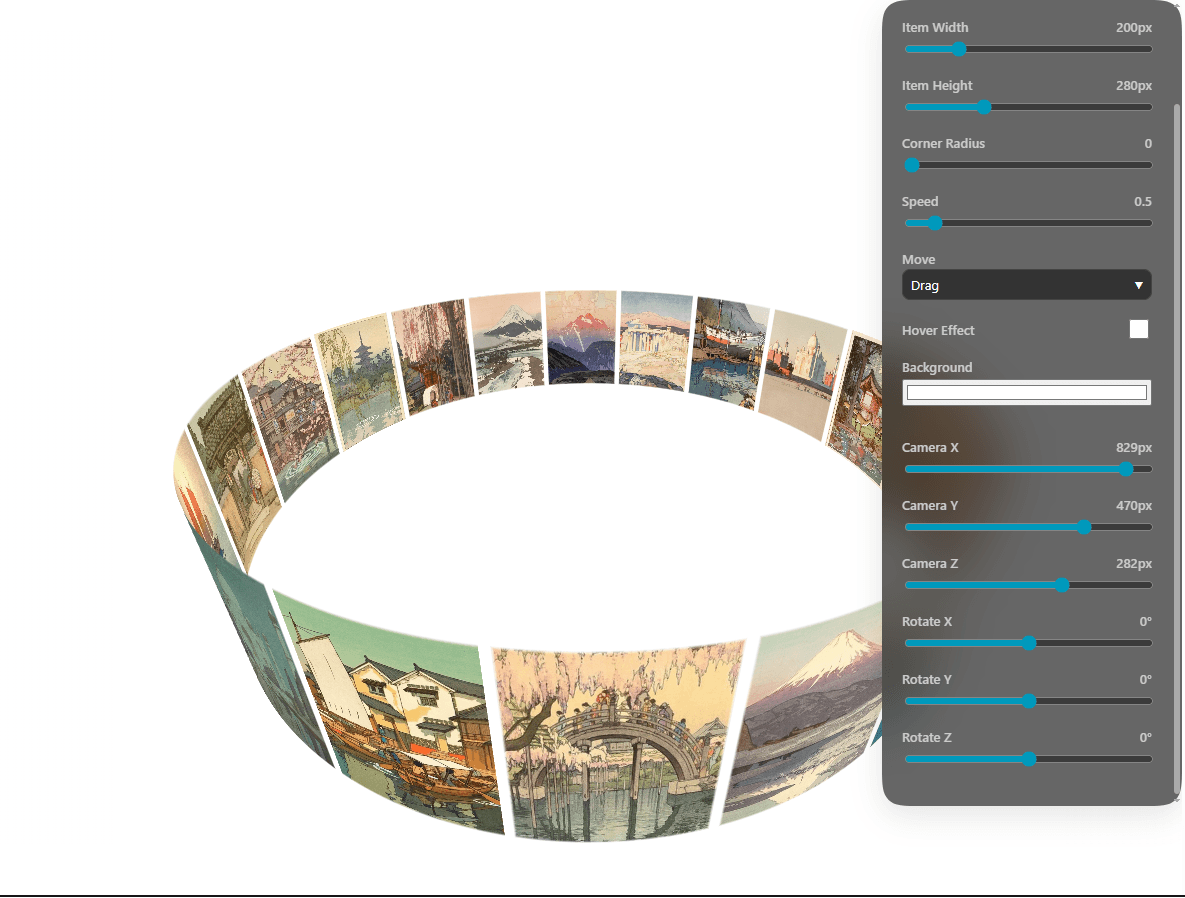
I’m taking the 3D carousel and putting the entire cockpit right next to the preview.
Every single property control stays docked alongside the live canvas.
Slide the Camera X, Y, and Z to instantly shift from an immersive center view to a sweeping "roundabout" perspective. Tweak Radius, Item Width/Height, and Rotation Speed on the fly. Toggle the Hover Effect on/off. Adjust Corner Radius with a slider. Change the Background Color with a single click.
No guessing. No jumping into code. Just drag, slide, and watch the 3D scene morph in real-time.
New: Framer Agent’s model picker now includes Reasoning and Fast Mode, so you can control how much a model thinks before building and, when supported, how fast it works. https://hy.chujiqiqi.com/updates/agent-reasoning-and-fast-mode
I’m taking an old workhorse and giving it a major facelift.
I’m keeping every single property control docked right next to the preview.
Sliders for size, movement, camera position (X, Y, Z), and rotation; toggles for hover, speed, and corner radius; and color picker.
Everything is exposed,except for objects.
I made 2 template sales in my first week.
Then I ran a little experiment: I stopped posting on the Framer Community for a while.
Result?
0 sales.
For me, this confirmed two things:
Engagement makes a real difference.
Posting, sharing, and being active in the community actually drives attention and sales.
Template sales on Framer are still very possible.
The demand is there, you just need to consistently put your work in front of people.
Back to posting. 😄
Honest update: I didn't sell a single component last month. Brutal, right? 😅
So instead of letting them gather digital dust, I'm doing a full reset, every single component is now $5.
How I run 34 shader backgrounds on a single Framer homepage without crashing. Here’s how:
Browsers have a hard limit on how many WebGL contexts you can run at once — usually 10 to 15 before things start freezing or the page just dies. That’s not a Framer thing, it’s a GPU safety net. So if you tried to give 34 shader backgrounds their own component, you’d hit the wall in seconds.
Here’s what I did inside Uneo to safely offer 34 presets (and keep switching instant):
1. One context, one canvas, 4 active programs
I cache all shader data upfront for the presets you can cycle through, then only compile and keep hot what’s really needed. That dropped my footprint from 26 separate shader instances down to just 4 active GPU programs. The rest are on standby no extra contexts piling up, no limit hit.
2. Single massive shader file = instant switching
Yeah, putting everything into one huge code file felt challenging at first, but it makes cycling instant. Switching presets is just binding a different pre-compiled fragment program and updating uniforms. No reload, no recompile, no stutter.
3. Toggle the cache off in production
The cache is great while you’re exploring, but once you pick a single shader for your site, you don’t need 33 extras sitting in memory. A simple property toggle turns the cache off so only your chosen shader compiles, your published site stays lean.
4. Removable lazy-load with distance controls
I added an optional lazy-load system. You can tell the canvas to only initialize when the user scrolls within a specific distance, and destroy itself when they scroll far enough away. Great for keeping long pages snappy if the shader isn’t always in view.
No crashes, no context limits, and switching feels like flipping a switch.
Live: Uneo
Hope this helps someone hitting the same GPU limits in Framer. If you’ve found a different way to manage multiple shaders at scale, I’d genuinely love to hear it.
One of my favorite parts of building UNEO was experimenting with interactive shader backgrounds.
I wanted to create something beyond the usual SaaS gradients and static hero sections, so I built a shader system with different presets and controls that can be adjusted to match different brands.
The goal was to make the website feel more like a real product experience while keeping it flexible for anyone using the template.
Some of the things included:
✦ Interactive WebGL shader backgrounds
✦ Multiple visual presets
✦ Customizable controls
✦ Smooth Framer animations
✦ SaaS-focused sections and layouts
Building the shader system was probably the most challenging part of the project, but also the most rewarding.
You can try the shader presets here:
Would love to know:
Do you think interactive backgrounds make SaaS websites feel more premium, or do you prefer simpler designs?
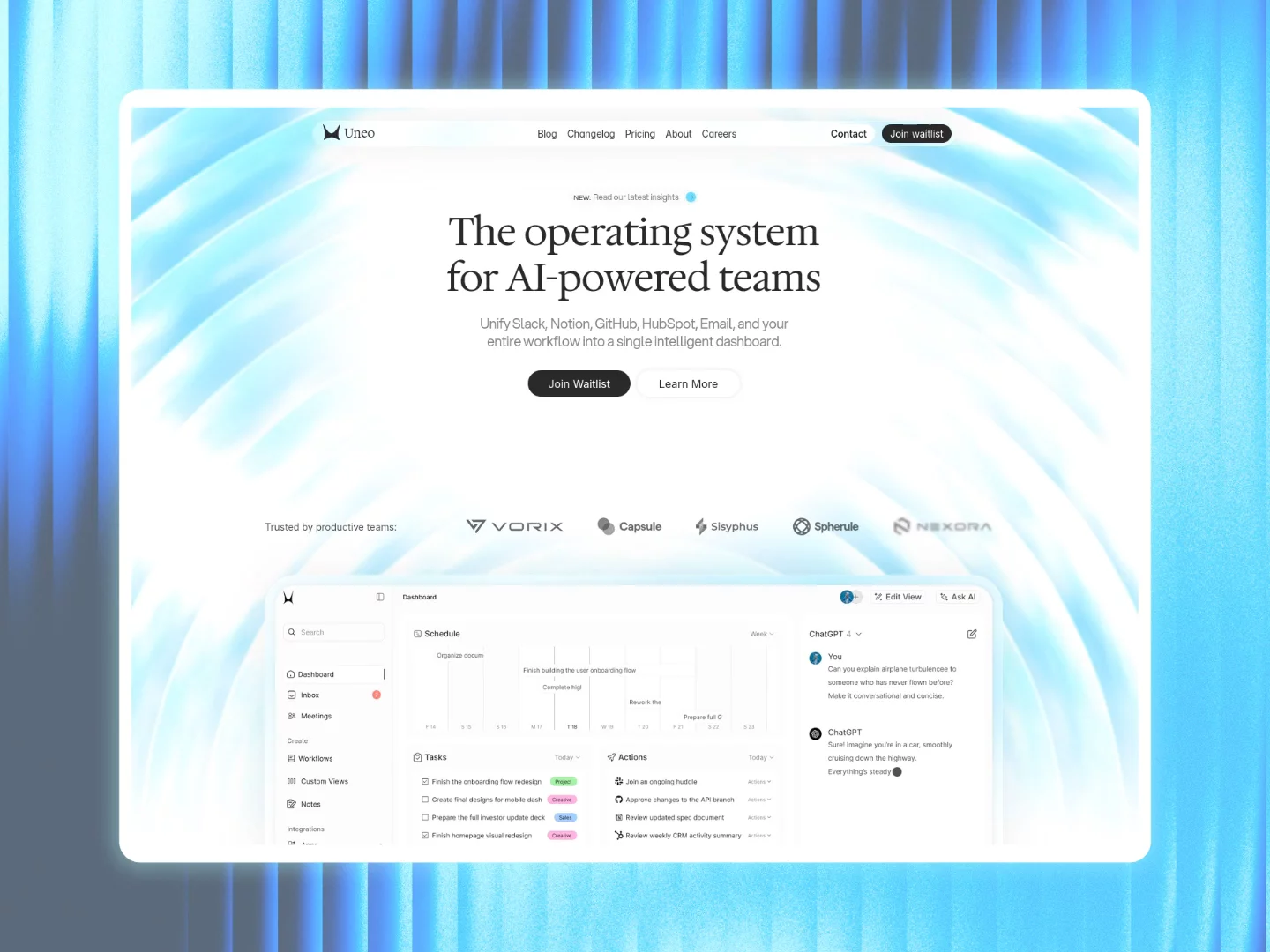
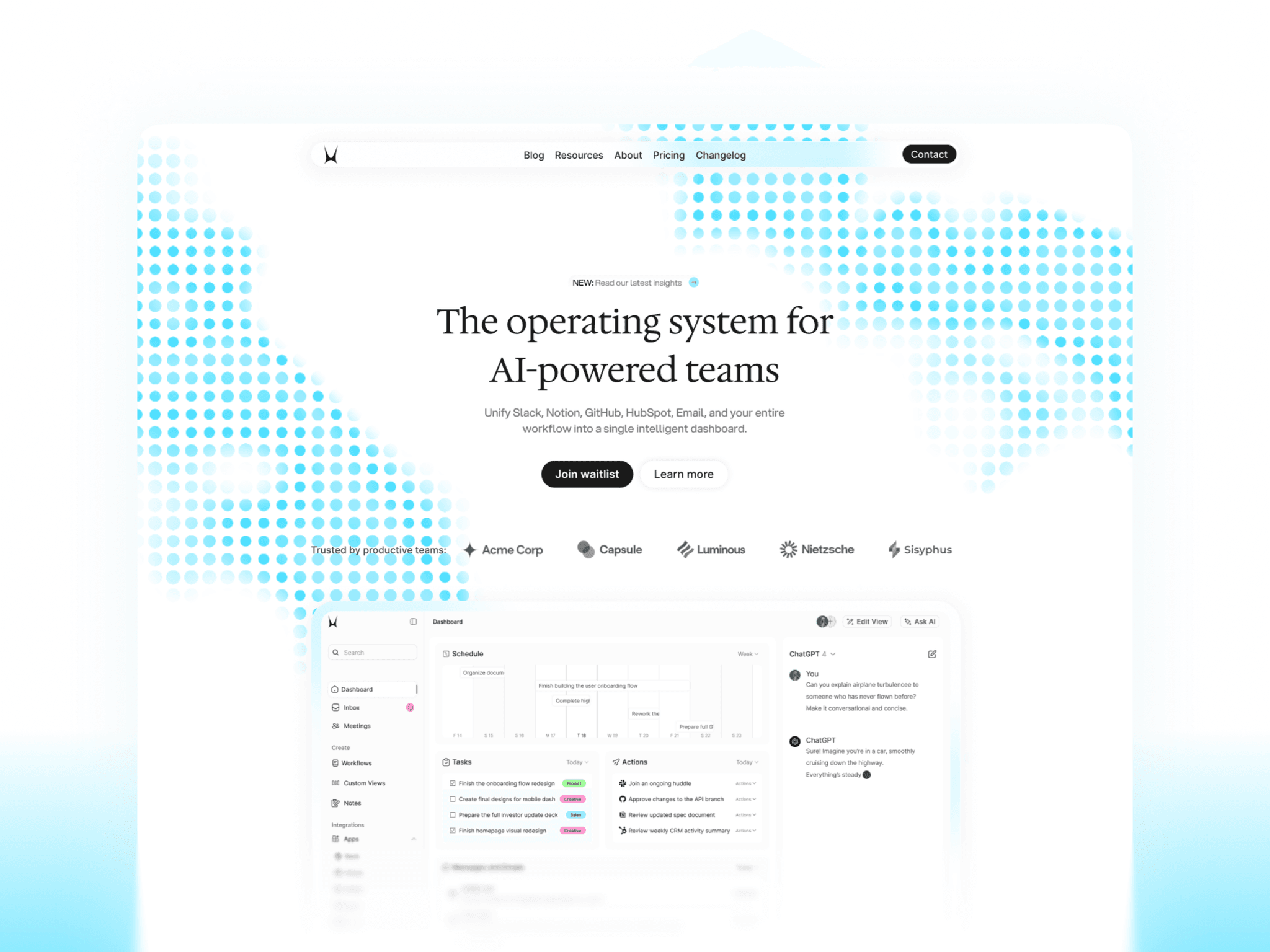
I just finished building Uneo, an AI SaaS-focused Framer template I’ve been working on for a while.
The idea was simple: start with a waitlist page, then expand into a full SaaS website when you’re ready. No rebuilding everything from scratch later.
I also spent a lot of time on the visuals. It includes interactive shader backgrounds with different presets and controls, so you can create a look that fits your brand.
Would love to hear what you think.
Just finished a bunch of custom interactive shader backgrounds for a Framer template. No plugins, pure webgl, all cursor‑reactive.
Honestly curious, if this were your template, what’s the first thing you’d refine?
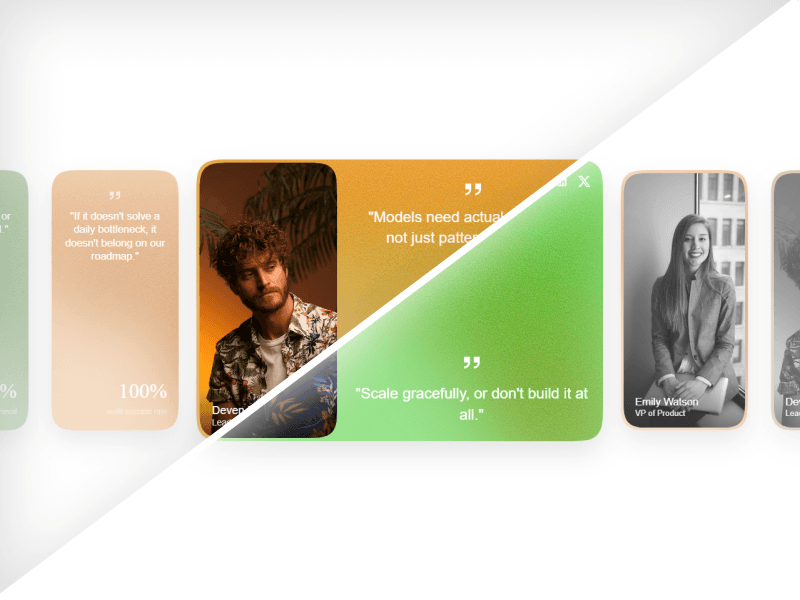
I’m giving away my new slider component for Framer for free for the next 24 hours.
It’s designed for testimonial and team sections, with the active card coming into focus while the surrounding cards recede with blur, opacity, and grayscale.
There are three layouts included: → Testimonials → Team → Custom Frames
You can also switch between shader, gradient, noise, and glass backgrounds.
I added a separate preview component to the Marketplace page so you can try changing most of the property controls directly in Framer before installing it.
I built a whole component just to showcase another component.
I wanted people to actually interact with the Card Carousel before deciding whether to use it, so I built a dedicated property control component for it.
What would you use it for: testimonials, team sections, or something else?
Anyone else noticing Framer activity going wild since yesterday?
Feels like it doubled overnight. Not complaining, just curious if it's the same for everyone.
Trying to climb the Framer ranks.
Up 12 spots today, feels good.
Not huge yet, but we're getting there.
Help me climb higher: https://uneo.framer.website
Uneo footer effects. Circles, cross, or upload your own images, your pick.
Makes a boring footer actually feel like part of the experience.
Component worthy? Your call.
Try it here: https://uneo.framer.website
Dropping a 3D particle system that actually respects your load times. ⚡
60K particles. Custom sprites (upload your own). Drag or mouse track the camera. Smart lazy-load with hysteresis, only renders when scrolled near, so your canvas stays snappy.
Square, circle, star, or your own image. Camera speed, depth, colors, all exposed.
And it's completely free. Grab it, tweak it, and make it yours.
Building a 3D playground.
Stars, circles, squares, and your own images floating around.
Colors, count, depth, all yours to control.
Background? Canvas? Or something entirely different? Your call.
Made these videos (and more) from Hiroshi Yoshida paintings for components that probably won't sell a single copy.
But I built them because I loved the art, and honestly, I just wanted to use them myself.
Here's the link if you're curious: https://carouselgallery.framer.website/
Introducing Video Shaders. Shaders in Framer can now accept both images and video, which we’ve grouped under Media in the Insert panel. We’re first updating the Chromatic Aberration shader with video support and all-new controls. Videos even play in realtime as you’re editing properties. With our new properties, you can add glass-like curvature and dispersion to your videos and images with a few clicks. High-fidelity effects, web-ready, published in seconds. https://hy.chujiqiqi.com/updates/video-shaders
I’m taking the 3D carousel and putting the entire cockpit right next to the preview.
Every single property control stays docked alongside the live canvas.
Slide the Camera X, Y, and Z to instantly shift from an immersive center view to a sweeping "roundabout" perspective. Tweak Radius, Item Width/Height, and Rotation Speed on the fly. Toggle the Hover Effect on/off. Adjust Corner Radius with a slider. Change the Background Color with a single click.
No guessing. No jumping into code. Just drag, slide, and watch the 3D scene morph in real-time.
New: Framer Agent’s model picker now includes Reasoning and Fast Mode, so you can control how much a model thinks before building and, when supported, how fast it works. https://hy.chujiqiqi.com/updates/agent-reasoning-and-fast-mode
I’m taking an old workhorse and giving it a major facelift.
I’m keeping every single property control docked right next to the preview.
Sliders for size, movement, camera position (X, Y, Z), and rotation; toggles for hover, speed, and corner radius; and color picker.
Everything is exposed,except for objects.
I made 2 template sales in my first week.
Then I ran a little experiment: I stopped posting on the Framer Community for a while.
Result?
0 sales.
For me, this confirmed two things:
Engagement makes a real difference.
Posting, sharing, and being active in the community actually drives attention and sales.
Template sales on Framer are still very possible.
The demand is there, you just need to consistently put your work in front of people.
Back to posting. 😄
Honest update: I didn't sell a single component last month. Brutal, right? 😅
So instead of letting them gather digital dust, I'm doing a full reset, every single component is now $5.
How I run 34 shader backgrounds on a single Framer homepage without crashing. Here’s how:
Browsers have a hard limit on how many WebGL contexts you can run at once — usually 10 to 15 before things start freezing or the page just dies. That’s not a Framer thing, it’s a GPU safety net. So if you tried to give 34 shader backgrounds their own component, you’d hit the wall in seconds.
Here’s what I did inside Uneo to safely offer 34 presets (and keep switching instant):
1. One context, one canvas, 4 active programs
I cache all shader data upfront for the presets you can cycle through, then only compile and keep hot what’s really needed. That dropped my footprint from 26 separate shader instances down to just 4 active GPU programs. The rest are on standby no extra contexts piling up, no limit hit.
2. Single massive shader file = instant switching
Yeah, putting everything into one huge code file felt challenging at first, but it makes cycling instant. Switching presets is just binding a different pre-compiled fragment program and updating uniforms. No reload, no recompile, no stutter.
3. Toggle the cache off in production
The cache is great while you’re exploring, but once you pick a single shader for your site, you don’t need 33 extras sitting in memory. A simple property toggle turns the cache off so only your chosen shader compiles, your published site stays lean.
4. Removable lazy-load with distance controls
I added an optional lazy-load system. You can tell the canvas to only initialize when the user scrolls within a specific distance, and destroy itself when they scroll far enough away. Great for keeping long pages snappy if the shader isn’t always in view.
No crashes, no context limits, and switching feels like flipping a switch.
Live: Uneo
Hope this helps someone hitting the same GPU limits in Framer. If you’ve found a different way to manage multiple shaders at scale, I’d genuinely love to hear it.
One of my favorite parts of building UNEO was experimenting with interactive shader backgrounds.
I wanted to create something beyond the usual SaaS gradients and static hero sections, so I built a shader system with different presets and controls that can be adjusted to match different brands.
The goal was to make the website feel more like a real product experience while keeping it flexible for anyone using the template.
Some of the things included:
✦ Interactive WebGL shader backgrounds
✦ Multiple visual presets
✦ Customizable controls
✦ Smooth Framer animations
✦ SaaS-focused sections and layouts
Building the shader system was probably the most challenging part of the project, but also the most rewarding.
You can try the shader presets here:
Would love to know:
Do you think interactive backgrounds make SaaS websites feel more premium, or do you prefer simpler designs?
I just finished building Uneo, an AI SaaS-focused Framer template I’ve been working on for a while.
The idea was simple: start with a waitlist page, then expand into a full SaaS website when you’re ready. No rebuilding everything from scratch later.
I also spent a lot of time on the visuals. It includes interactive shader backgrounds with different presets and controls, so you can create a look that fits your brand.
Would love to hear what you think.
Just finished a bunch of custom interactive shader backgrounds for a Framer template. No plugins, pure webgl, all cursor‑reactive.
Honestly curious, if this were your template, what’s the first thing you’d refine?
I’m giving away my new slider component for Framer for free for the next 24 hours.
It’s designed for testimonial and team sections, with the active card coming into focus while the surrounding cards recede with blur, opacity, and grayscale.
There are three layouts included: → Testimonials → Team → Custom Frames
You can also switch between shader, gradient, noise, and glass backgrounds.
I added a separate preview component to the Marketplace page so you can try changing most of the property controls directly in Framer before installing it.
I built a whole component just to showcase another component.
I wanted people to actually interact with the Card Carousel before deciding whether to use it, so I built a dedicated property control component for it.
What would you use it for: testimonials, team sections, or something else?
Anyone else noticing Framer activity going wild since yesterday?
Feels like it doubled overnight. Not complaining, just curious if it's the same for everyone.
Trying to climb the Framer ranks.
Up 12 spots today, feels good.
Not huge yet, but we're getting there.
Help me climb higher: https://uneo.framer.website
Uneo footer effects. Circles, cross, or upload your own images, your pick.
Makes a boring footer actually feel like part of the experience.
Component worthy? Your call.
Try it here: https://uneo.framer.website
Dropping a 3D particle system that actually respects your load times. ⚡
60K particles. Custom sprites (upload your own). Drag or mouse track the camera. Smart lazy-load with hysteresis, only renders when scrolled near, so your canvas stays snappy.
Square, circle, star, or your own image. Camera speed, depth, colors, all exposed.
And it's completely free. Grab it, tweak it, and make it yours.
Building a 3D playground.
Stars, circles, squares, and your own images floating around.
Colors, count, depth, all yours to control.
Background? Canvas? Or something entirely different? Your call.
Made these videos (and more) from Hiroshi Yoshida paintings for components that probably won't sell a single copy.
But I built them because I loved the art, and honestly, I just wanted to use them myself.
Here's the link if you're curious: https://carouselgallery.framer.website/
Introducing Video Shaders. Shaders in Framer can now accept both images and video, which we’ve grouped under Media in the Insert panel. We’re first updating the Chromatic Aberration shader with video support and all-new controls. Videos even play in realtime as you’re editing properties. With our new properties, you can add glass-like curvature and dispersion to your videos and images with a few clicks. High-fidelity effects, web-ready, published in seconds. https://hy.chujiqiqi.com/updates/video-shaders
I’m taking the 3D carousel and putting the entire cockpit right next to the preview.
Every single property control stays docked alongside the live canvas.
Slide the Camera X, Y, and Z to instantly shift from an immersive center view to a sweeping "roundabout" perspective. Tweak Radius, Item Width/Height, and Rotation Speed on the fly. Toggle the Hover Effect on/off. Adjust Corner Radius with a slider. Change the Background Color with a single click.
No guessing. No jumping into code. Just drag, slide, and watch the 3D scene morph in real-time.
New: Framer Agent’s model picker now includes Reasoning and Fast Mode, so you can control how much a model thinks before building and, when supported, how fast it works. https://hy.chujiqiqi.com/updates/agent-reasoning-and-fast-mode
I’m taking an old workhorse and giving it a major facelift.
I’m keeping every single property control docked right next to the preview.
Sliders for size, movement, camera position (X, Y, Z), and rotation; toggles for hover, speed, and corner radius; and color picker.
Everything is exposed,except for objects.
I made 2 template sales in my first week.
Then I ran a little experiment: I stopped posting on the Framer Community for a while.
Result?
0 sales.
For me, this confirmed two things:
Engagement makes a real difference.
Posting, sharing, and being active in the community actually drives attention and sales.
Template sales on Framer are still very possible.
The demand is there, you just need to consistently put your work in front of people.
Back to posting. 😄
Honest update: I didn't sell a single component last month. Brutal, right? 😅
So instead of letting them gather digital dust, I'm doing a full reset, every single component is now $5.
How I run 34 shader backgrounds on a single Framer homepage without crashing. Here’s how:
Browsers have a hard limit on how many WebGL contexts you can run at once — usually 10 to 15 before things start freezing or the page just dies. That’s not a Framer thing, it’s a GPU safety net. So if you tried to give 34 shader backgrounds their own component, you’d hit the wall in seconds.
Here’s what I did inside Uneo to safely offer 34 presets (and keep switching instant):
1. One context, one canvas, 4 active programs
I cache all shader data upfront for the presets you can cycle through, then only compile and keep hot what’s really needed. That dropped my footprint from 26 separate shader instances down to just 4 active GPU programs. The rest are on standby no extra contexts piling up, no limit hit.
2. Single massive shader file = instant switching
Yeah, putting everything into one huge code file felt challenging at first, but it makes cycling instant. Switching presets is just binding a different pre-compiled fragment program and updating uniforms. No reload, no recompile, no stutter.
3. Toggle the cache off in production
The cache is great while you’re exploring, but once you pick a single shader for your site, you don’t need 33 extras sitting in memory. A simple property toggle turns the cache off so only your chosen shader compiles, your published site stays lean.
4. Removable lazy-load with distance controls
I added an optional lazy-load system. You can tell the canvas to only initialize when the user scrolls within a specific distance, and destroy itself when they scroll far enough away. Great for keeping long pages snappy if the shader isn’t always in view.
No crashes, no context limits, and switching feels like flipping a switch.
Live: Uneo
Hope this helps someone hitting the same GPU limits in Framer. If you’ve found a different way to manage multiple shaders at scale, I’d genuinely love to hear it.
One of my favorite parts of building UNEO was experimenting with interactive shader backgrounds.
I wanted to create something beyond the usual SaaS gradients and static hero sections, so I built a shader system with different presets and controls that can be adjusted to match different brands.
The goal was to make the website feel more like a real product experience while keeping it flexible for anyone using the template.
Some of the things included:
✦ Interactive WebGL shader backgrounds
✦ Multiple visual presets
✦ Customizable controls
✦ Smooth Framer animations
✦ SaaS-focused sections and layouts
Building the shader system was probably the most challenging part of the project, but also the most rewarding.
You can try the shader presets here:
Would love to know:
Do you think interactive backgrounds make SaaS websites feel more premium, or do you prefer simpler designs?
I just finished building Uneo, an AI SaaS-focused Framer template I’ve been working on for a while.
The idea was simple: start with a waitlist page, then expand into a full SaaS website when you’re ready. No rebuilding everything from scratch later.
I also spent a lot of time on the visuals. It includes interactive shader backgrounds with different presets and controls, so you can create a look that fits your brand.
Would love to hear what you think.
Just finished a bunch of custom interactive shader backgrounds for a Framer template. No plugins, pure webgl, all cursor‑reactive.
Honestly curious, if this were your template, what’s the first thing you’d refine?
I’m giving away my new slider component for Framer for free for the next 24 hours.
It’s designed for testimonial and team sections, with the active card coming into focus while the surrounding cards recede with blur, opacity, and grayscale.
There are three layouts included: → Testimonials → Team → Custom Frames
You can also switch between shader, gradient, noise, and glass backgrounds.
I added a separate preview component to the Marketplace page so you can try changing most of the property controls directly in Framer before installing it.
I built a whole component just to showcase another component.
I wanted people to actually interact with the Card Carousel before deciding whether to use it, so I built a dedicated property control component for it.
What would you use it for: testimonials, team sections, or something else?